Beyond Glassv0.1.3

Beyond Glass

A glass shell for DeepSeek Harness

Foldable sidebars, a launcher with a data island, nine wallpapers — as six packages. The frame is the author's own setup; the field around it is live.

127.0.0.1:3080
Deep Ocean 1 / 9

Three pieces of interface

Everything in these three cards is in the packages. Every screenshot on this page comes from the author's own setup: the launcher opens on these nine cards out of the box — their names, descriptions, covers and categories all ship with the packages — but the applications behind them do not. Each is a plugin of its own, and opening one of those cards says so.

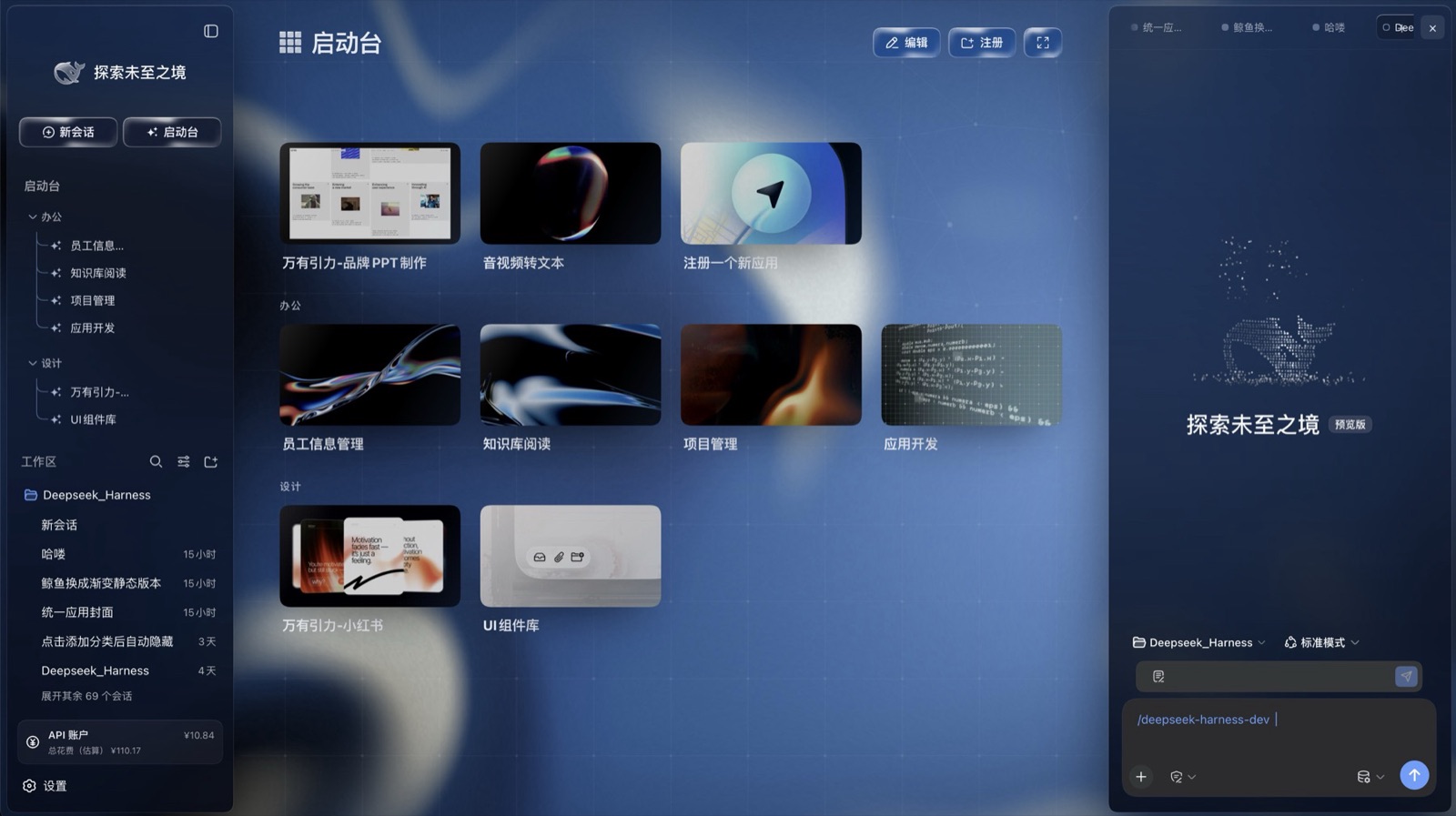
Glass three columns

Brand rail, left sidebar and right sidebar all sit on the same glass tokens: translucent gradient, backdrop blur, hairline edge. The left folds to an icon rail, the right folds away entirely.

ui-layout · ui-sidebar · ui-sidebar-right
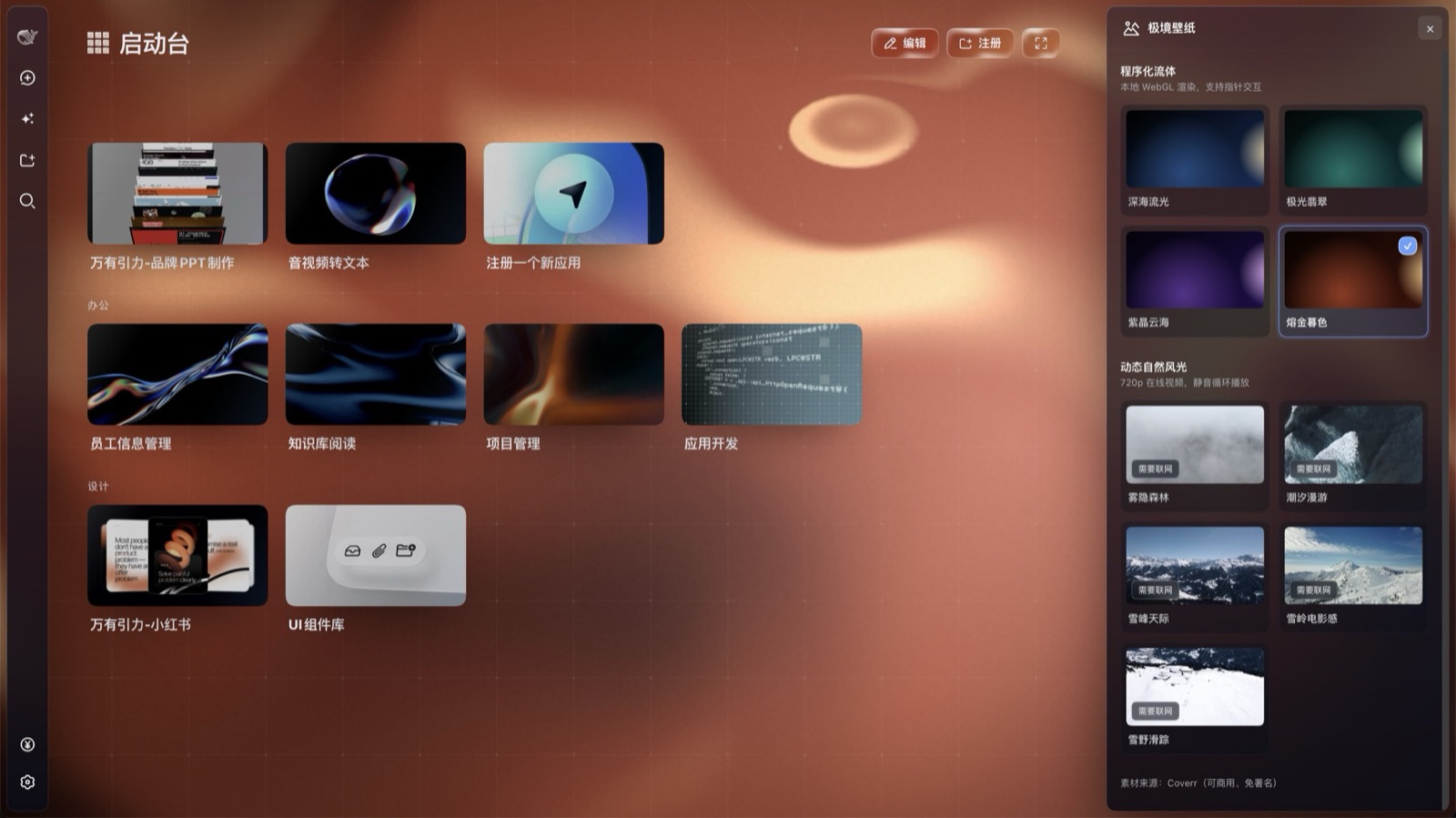
Wallpaper picker

Four procedural fluid palettes drawn locally in WebGL, five muted nature loops, one panel in the right column. Selecting one repaints every surface in the app.

ui-wallpaper

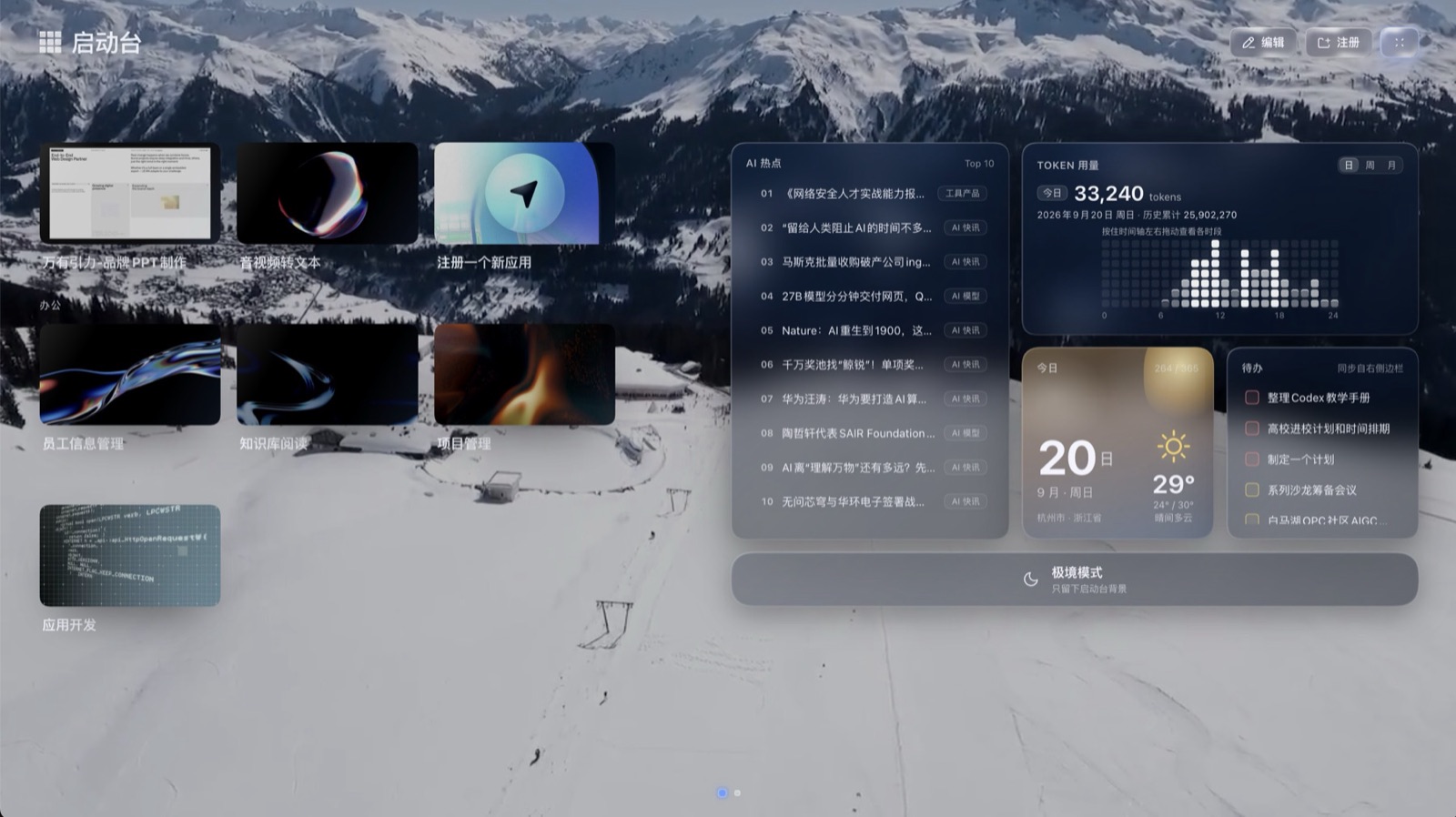
Launcher and data island

A launcher that lays apps out by category, and an immersive mode whose right half is a data island: AI headlines, token usage, date and weather, to-dos.

ui-workbench

What the packages do not include

The boundary is worth stating plainly, because three of these look like missing features and are not.

  • The launcher's apps. Each one is its own plugin. These packages ship the launcher, its category grid, the card treatment and the registration point; what appears in yours depends on what you install.
  • The right column's other panels. Plugin market, skin switcher, unified covers — each registers into a seat. These packages ship the column, sessions and wallpapers.
  • The to-do card's data. It reads the right sidebar's to-do panel, which is not in these packages, so it is empty on a clean host.
  • Weather, when the host cannot reach it. The card resolves a city from the egress IP and fetches from Open-Meteo, host-side. Behind a proxy, or offline, it stays on its locating state and reports nothing — by design, not as a bug.

Install

Node.js, pnpm and the dsh command — dsh plugin forwards to pnpm, so pnpm has to be on PATH. No clone, no build. All six packages go in at once — one of them is the profile layer that mounts the other five.

You already have the harness

Confirm the version first — 0.1.5-rc.2 or 0.1.6-alpha.2. Anything else is untested.

# macOS / Linux — bash, zsh
dsh --version      # 0.1.5-rc.2 or 0.1.6-alpha.2

BASE=https://github.com/LeoEthanZ/dsh-beyond-glass/releases/download/v0.1.3

# create the profile first (plain add leaves it with no app layer)
dsh --profile glass --from-default-profile web --dump-config > /dev/null

dsh plugin --profile glass add \
  $BASE/beyond-glass-harness-0.1.6-alpha.2.tgz \
  $BASE/beyond-glass-ui-layout-0.1.5-rc.2.tgz \
  $BASE/beyond-glass-ui-sidebar-0.1.5-rc.2.tgz \
  $BASE/beyond-glass-ui-sidebar-right-0.1.5-rc.2.tgz \
  $BASE/deepseek-ai-dsh-client-ui-wallpaper-0.1.2-rc.1.tgz \
  $BASE/deepseek-ai-dsh-client-ui-workbench-0.1.2-rc.1.tgz

dsh --profile glass
# Windows — PowerShell
dsh --version      # 0.1.5-rc.2 or 0.1.6-alpha.2

$BASE = "https://github.com/LeoEthanZ/dsh-beyond-glass/releases/download/v0.1.3"

# create the profile first (plain add leaves it with no app layer)
dsh --profile glass --from-default-profile web --dump-config > $null

dsh plugin --profile glass add `
  "$BASE/beyond-glass-harness-0.1.6-alpha.2.tgz" `
  "$BASE/beyond-glass-ui-layout-0.1.5-rc.2.tgz" `
  "$BASE/beyond-glass-ui-sidebar-0.1.5-rc.2.tgz" `
  "$BASE/beyond-glass-ui-sidebar-right-0.1.5-rc.2.tgz" `
  "$BASE/deepseek-ai-dsh-client-ui-wallpaper-0.1.2-rc.1.tgz" `
  "$BASE/deepseek-ai-dsh-client-ui-workbench-0.1.2-rc.1.tgz"

dsh --profile glass
  • Pick an unused profile name. If the name is taken, add stacks onto that existing profile instead of creating a new one. glass is only an example.
  • Your current setup is untouched. The UI lives in the new profile; run it with dsh --profile glass and your usual command still behaves as before.
  • To remove it: dsh plugin --profile glass remove the six package names, or delete the profile directory — ~/.dsh/profiles/glass, or %USERPROFILE%\.dsh\profiles\glass on Windows.

If this saves you an evening, a star is the whole payment for it.

★ Star on GitHub